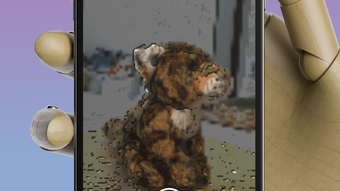

Download 3D Scanner App – 3D scanner, 3D scanning app, 3D modeling, 3D capture, 3D object scanner, 3D scan to STL, 3D scan to OBJ, 3D scan to PLY, 3D scan to USDZ, 3D scan app for iPhone, 3D scan app for iPad, 3D scan for games, 3D scan for design
Overview
The 3D Scanner App by Route One Consulting Pte Ltd is a desktop-compatible application designed for iOS devices, enabling users to capture high-quality 3D scans using compatible iPhones and iPads. The software allows users to digitize physical objects and environments, transforming them into digital 3D models that can be exported in widely supported formats such as STL, OBJ, USDZ, and PLY. This functionality makes it a valuable tool for 3D designers, game developers, and creators involved in digital content production.
The app leverages the TrueDepth camera system found on select Apple devices to capture detailed surface geometry and color data, while the LiDAR sensor enables scanning of larger spaces such as rooms, furniture, and architectural features. Real-world use cases include prototyping, digital archiving, virtual exhibitions, and asset creation for augmented reality experiences. The software is intended for creative professionals and hobbyists seeking accessible 3D capture tools without the need for expensive hardware.
The developer did not provide additional background on Route One Consulting Pte Ltd beyond the company name. No subscription fees or in-app purchases are required, offering a straightforward user experience. The app supports both color and monochrome scans, with options for point cloud or full mesh output, allowing flexibility in workflow and output quality.
Key Features & Capabilities
- TrueDepth Camera Integration – Utilizes the TrueDepth camera on supported Apple devices to capture detailed 3D geometry and color information from physical objects like toys, models, and small furniture.
- LiDAR Scanning Support – Enables scanning of larger environments such as apartments, rooms, and architectural spaces using devices equipped with a LiDAR sensor.
- Multiple Output Formats – Exports scans in standard 3D formats including STL, OBJ, USDZ, and PLY, ensuring compatibility with 3D modeling, printing, and AR platforms.
- Scan Customization Options – Users can choose between color and monochrome scans, as well as point cloud or full mesh rendering, depending on their project needs.
- Integrated Tutorials – Provides video guides to help users improve scanning techniques and achieve optimal results, especially beneficial for beginners.
- One-Time Purchase Model – No recurring subscriptions or in-app purchases are required, ensuring a transparent and uninterrupted experience.
These features allow users to digitize physical objects and spaces with minimal setup. For instance, a game developer can scan a prop to use in a virtual environment, while a designer might capture a prototype for rapid iteration. The ability to export in multiple formats ensures broad compatibility across creative workflows. The inclusion of tutorial content supports user onboarding and helps reduce the learning curve. The app is optimized for use on mobile devices, focusing on intuitive scanning processes rather than complex post-processing tools.
User Interface, Workflow & Performance
The 3D Scanner App features a clean, minimal interface designed for ease of navigation across iPhone and iPad devices. The layout prioritizes core functions—starting a scan, viewing results, and exporting files—ensuring a streamlined user journey. Navigation is intuitive, with clearly labeled buttons and visual feedback during scanning sessions.
Users can switch between scan modes and adjust settings through simple toggles. The workflow is structured around a step-by-step process: position the device, begin scanning, review the output, and export the file. Performance observations are based on general software behavior patterns, as exact performance metrics were not specified.
The app appears to manage real-time processing efficiently, though resource usage details such as CPU or RAM consumption were not provided. Stability is assumed to be consistent, given the absence of reported crashes or errors in the official description. The developer did not specify whether the app runs in the background or supports batch processing.
Users should expect a responsive interface during active scanning, with processing times dependent on scan complexity and device capabilities.
Compatibility & System Requirements
The 3D Scanner App is designed for iOS devices, specifically those equipped with a TrueDepth camera. This includes iPhone X, iPhone Xs, iPhone Xr, iPhone Xs Max, iPhone 11, iPhone 11 Pro, iPhone 11 Pro Max, iPhone 12, iPhone 12 Pro, iPhone 12 Pro Max, iPhone 13 Pro, iPhone 13 Pro Max, and compatible iPad Pro models. For LiDAR-based scanning, devices must have a LiDAR sensor, such as the iPad Pro (2020 and later) or iPhone 12 Pro, iPhone 12 Pro Max, iPhone 13 Pro, and iPhone 13 Pro Max.
The app has a file size of 45.6 MB, indicating a lightweight installation. Exact system requirements were not listed, and no additional hardware dependencies beyond the camera systems were mentioned. The developer did not provide information on iOS version compatibility, so users should ensure their device is running a supported version of iOS.
No information was provided regarding network connectivity needs or cloud integration.
Pros and Cons
Pros
- High-quality 3D scanning using TrueDepth and LiDAR cameras
- Supports multiple export formats for broad compatibility
- Intuitive interface suitable for beginners and professionals
- No subscriptions or in-app purchases required
- Includes tutorial videos for improved user onboarding
- Lightweight installation at 45.6 MB
Cons
- Requires specific Apple devices with TrueDepth or LiDAR cameras
- Not available on Windows or Mac platforms
- Performance and resource usage details not disclosed
- Limited to iOS ecosystem, restricting cross-platform use
- No mention of post-processing tools or editing capabilities
FAQ Section
Is the 3D Scanner App compatible with all iPhones?
The app requires a device with a TrueDepth camera, which is only available on specific iPhone models including the iPhone X and later, such as the iPhone 12 Pro, iPhone 13 Pro, and their Max variants. For LiDAR scanning, a compatible LiDAR sensor is required.
Can I use the app on my iPad?
Yes, the app supports iPad Pro models that include the TrueDepth camera and LiDAR sensor, such as the 2020 and later iPad Pro versions.
Is the app secure to download and use?
The app is developed by Route One Consulting Pte Ltd and distributed through the Apple App Store. It does not require access to sensitive data beyond camera permissions, and no security vulnerabilities were reported in the official description.
Are there any in-app purchases or subscriptions?
No, the app operates on a one-time purchase model. There are no recurring fees, subscriptions, or in-app purchases.
Can I scan large objects or entire rooms?
Yes, with devices equipped with a LiDAR sensor, the app supports scanning of larger environments such as rooms, furniture, and architectural spaces. The scanning range and accuracy depend on the device’s hardware and environmental conditions.
Final Thoughts
The 3D Scanner App delivers a focused, high-utility solution for users seeking accessible 3D capture on Apple devices. Its integration with TrueDepth and LiDAR technology enables detailed scanning of both small objects and large spaces, making it a powerful tool for 3D designers, game developers, and AR creators. The clean interface, tutorial support, and one-time purchase model enhance the overall user experience.
While its availability is limited to specific iOS devices and lacks cross-platform support, the app excels in its niche. For creative professionals and hobbyists working within the Apple ecosystem, this tool offers a reliable way to digitize real-world items with minimal friction. The absence of subscriptions and in-app purchases ensures a transparent, uninterrupted workflow.
With strong export capabilities and a lightweight footprint, the 3D Scanner App stands out as a practical choice for modern 3D content creation.
Download 3D Scanner App now







